


Inventory Tracking Basics for Small Online Stores
Why inventory tracking matters earlier than people think
A lot of small store owners assume inventory tracking becomes important only after the store starts getting busy. Until then, it can feel like something you can keep in your head, jot down in a notebook, or check manually whenever an order comes in. That works for a little while, until it doesn’t.
The problem usually shows up in small ways first. You sell the last two units of an item but forget to update the listing. You think you still have a size left, but it was packed into a wholesale order last week. A customer places an order, then you realize the item is actually out of stock. That is where inventory stops being a background task and starts affecting trust.
For a small online store, inventory tracking is not only about staying organized. It helps you avoid overselling, spot what is running low, and keep the customer experience calmer. A simple system is usually enough to start. What matters is that you actually use it.
What a simple inventory system should do
A beginner inventory system does not need advanced forecasting, warehouse tools, or barcode scanners right away. It needs to answer a few practical questions clearly.
At minimum, your system should tell you:
- what products you currently have available
- how many units of each item are left
- which sizes, colors, or variants are in stock
- what is running low
- what has sold recently
- what needs to be restocked or remade soon
That is enough to prevent a lot of avoidable chaos.
A simple inventory setup also helps you make better product decisions. If one item sells steadily and another barely moves, that matters. If one size or scent always runs out first, that matters too. Inventory is not just a count. It is feedback.
For a small store, the goal is not building a perfect stock system on day one. The goal is having one source of truth that you trust enough to use every time something changes.
How to start tracking inventory without making it complicated
The easiest way to start is to use one clear system and avoid splitting your stock information across too many places. A store owner may have product counts in the ecommerce platform, a few notes in a spreadsheet, some numbers in their head, and a few updates inside packing messages. That is where confusion starts.
Pick one main place to track stock. For many small stores, that is either:
- the inventory feature inside the store platform
- a simple spreadsheet that is updated consistently
- a lightweight inventory tool if the platform setup is not enough
The best choice is usually the one you can keep updated without drama.
Start with SKUs or simple item labels
Each product or variant should have a clear identifier. It does not need to be fancy. It just needs to help you tell one item from another without guessing.
A tote bag in sand beige and a tote bag in charcoal should not both live in your system under “tote bag.” The same goes for sizes, scents, bundles, or seasonal versions. Clear item labels reduce mistakes fast.
Track variants separately
One of the easiest inventory mistakes is tracking the product but not the variant. A shirt may still be “in stock” overall, but the medium may be gone. A candle line may still be active, but one scent is out. Inventory needs to reflect what the customer can actually buy.
That means:
- sizes should be counted separately
- colors should be counted separately
- bundles should be counted separately
- limited editions should not be mixed into standard stock
This is where clarity does real work.
Count what you physically have
Before setting up the system, do a real count. Not an estimate. Not “I think we have around twelve.” A real count.
This sounds obvious, but many small stores build the system around guessed numbers, then wonder why the stock keeps drifting. Start with what is physically there. That gives you a cleaner baseline.
Practical steps
- Pick one main place to track inventory.
- Create clear names or SKUs for products and variants.
- Do a real starting count.
- Enter the numbers carefully once.
- Update the system every time stock changes.
- Review low-stock items on a regular schedule.
This is simple, but it works when you actually stay with it.
What to watch once orders start coming in
Once the store starts making sales, inventory tracking becomes less about setup and more about rhythm. The question changes from “How do I build the system?” to “How do I keep the numbers accurate?”
The biggest habit is updating stock as soon as it changes. That includes:
- online orders
- in-person sales if you do both
- damaged items
- returns that can go back into stock
- bundles assembled from separate items
- samples or items used for photos
This is why stores get into trouble when inventory is treated as “something I’ll update later.” Later is usually where the mismatch begins.
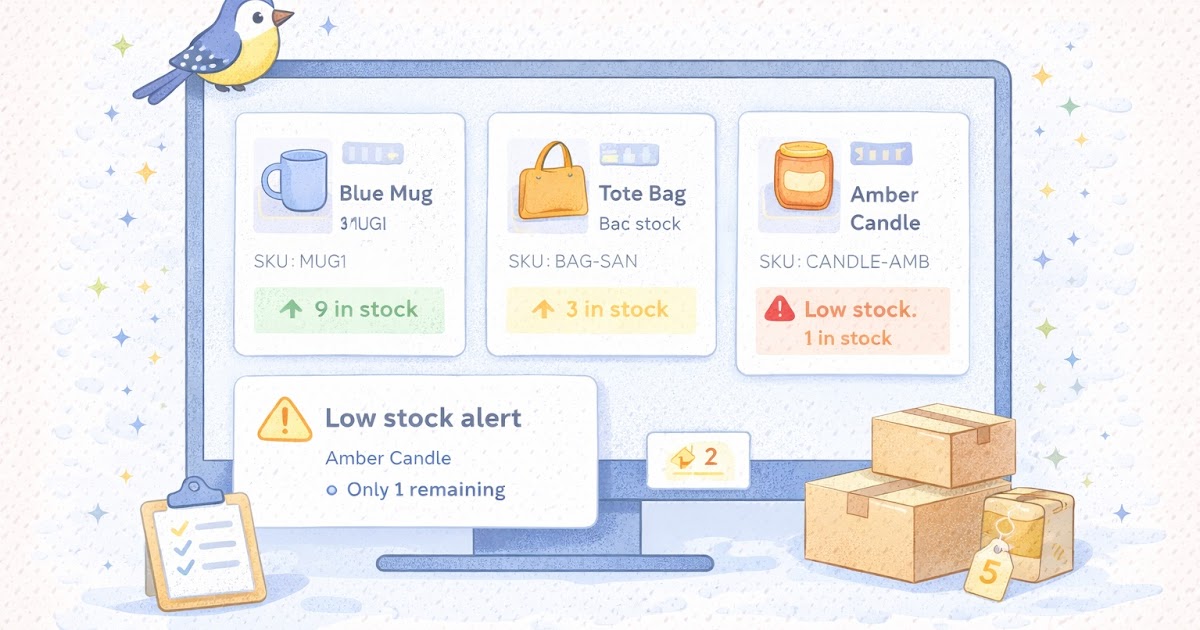
Another helpful habit is setting a low-stock threshold. You do not need a complicated formula. Just choose a simple number that tells you it is time to pay attention. For some items, that may be 5 units left. For others, maybe 2. The point is to avoid being surprised.
A small store can also benefit from a regular inventory check. Weekly or biweekly is often enough early on. This is not a full warehouse audit. It is a simple check on top sellers, low-stock products, and items that often go out of sync.
A simple example: imagine a small candle shop with three best-selling scents. If one of them drops below 4 jars and the owner does not notice until the last one sells, the next customer may see “out of stock” before there is time to pour more. A basic low-stock alert or weekly review would catch that earlier.
Common inventory mistakes to avoid
One common mistake is keeping inventory “close enough” instead of accurate enough. A lot of store owners do this because they are busy, but stock errors tend to create bigger problems than the few minutes saved.
Another issue is not separating inventory by channel. If you sell online and also do markets, pop-ups, or wholesale, the counts need to reflect all of it. Otherwise the online store may show inventory that was already sold elsewhere.
A third mistake is forgetting that product kits or bundles affect stock too. If you sell a gift box made from three separate products, those pieces should come out of inventory when the bundle sells. If they do not, your counts will look fine while the shelf tells a different story.
Common mistakes
- guessing starting inventory instead of counting it
- tracking products but not variants
- updating stock late instead of right away
- forgetting to remove damaged, sampled, or reserved items
- treating online and offline inventory as separate realities
- ignoring low-stock thresholds
- not checking whether the numbers still match what is physically there
There is also the mistake of making the system more complex than necessary. A store with thirty products does not need the same setup as a business shipping thousands of units a month. Too much complexity can cause its own kind of mess.
A simple system you actually use is better than an impressive one you avoid.
A quick inventory checklist summary
Quick checklist
- [ ] One main system is used to track stock
- [ ] Each product and variant has a clear label or SKU
- [ ] Starting inventory was physically counted
- [ ] Stock gets updated every time it changes
- [ ] Online and offline sales both affect the same counts
- [ ] Bundles and kits are accounted for properly
- [ ] Low-stock thresholds are set for key items
- [ ] Damaged or non-sellable items are removed from stock counts
- [ ] Inventory is reviewed on a regular schedule
- [ ] The system feels simple enough to keep using
If several of these basics are missing, the inventory problem is usually not a software problem first. It is usually a process problem.
Start simple, then tighten the system over time
Inventory tracking does not need to feel intimidating. For a small online store, the first win is simply getting the counts into one place and keeping them current.
That alone can reduce overselling, make restocking easier, and help the store feel more reliable from the customer side. Over time, you can add better low-stock alerts, tighter SKU logic, or more detailed reporting if the business needs it. But the first version only has to do one thing well: help you know what you actually have.
That is more valuable than it sounds.
Gentle next step
Choose one product category or your top ten best sellers and do a real stock count this week. Put those numbers into one main system, label the variants clearly, and set a simple low-stock threshold for each. Sin estrés. A clean inventory baseline solves more problems than adding another tool before the basics are under control.
FAQs
Q1. Do I need inventory software right away?
A1. Not always. Many small stores can start with the inventory tools already built into their platform or a simple spreadsheet, as long as the system stays accurate and updated.
Q2. Should I track variants separately?
A2. Yes. Sizes, colors, scents, bundles, and other variants should be tracked separately so the store reflects what is actually available.
Q3. How often should I check inventory?
A3. That depends on how many orders you have, but a weekly or biweekly review is a practical starting point for many small stores.
Q4. What is the biggest beginner inventory mistake?
A4. Usually it is letting stock live in too many places at once or waiting too long to update the numbers after sales and changes.