


The Minimum Tech Stack for a Small Online Store
Why small stores usually overbuild their tech stack
A lot of small store owners start researching tools before the store is even live. They compare email platforms, popup apps, analytics dashboards, review systems, shipping tools, help desks, upsell apps, loyalty software, and five different automation add-ons. The result is familiar: more tabs, more monthly costs, and more decisions than the store actually needs.
That usually happens because the internet makes it sound like every store needs a “stack” from day one. In reality, most small ecommerce businesses need a simple foundation, not a pile of apps.
A smaller tech stack is easier to afford, easier to manage, and easier to trust. When there are fewer moving parts, there are fewer things to break, fewer subscriptions to forget about, and fewer places where the customer experience can feel clunky.
For a small online store, the smartest first move is usually to build around the minimum tools that help you launch, get paid, ship orders, answer customers, and stay in touch. The rest can wait until the store has real volume and real friction to solve.
What you actually need to launch
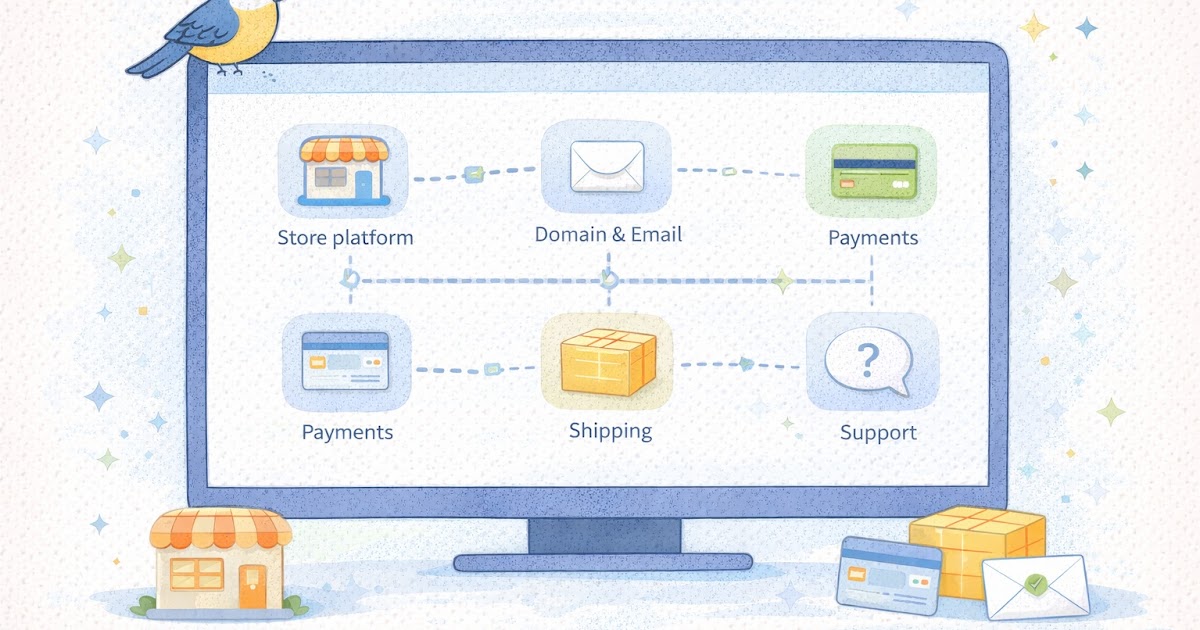
The minimum tech stack for most small online stores is smaller than people expect. In many cases, you only need a few core pieces working well.
1) A store platform
This is the base layer. It is where your products live, where the checkout happens, and where the customer experiences the store.
A good platform should let you:
- list products clearly
- organize categories
- take payments
- manage orders
- handle basic pages like FAQ, returns, and contact
- make simple updates without needing a developer for everything
For most beginners, the best starting platform is usually the one you can actually operate without constant technical drama. A platform that looks flexible but becomes hard to maintain can create more problems than it solves.
2) A domain and business email
These are small details that do a lot of quiet work. A custom domain helps the store look real. A business email tied to that domain helps with trust and basic operations.
Customers tend to feel more comfortable emailing [email protected] than a random free email address. It also keeps your business more organized as the store grows.
3) Payment processing
If the store cannot take payments clearly and reliably, nothing else matters much. This setup should be simple, testable, and easy for you to understand before launch.
You do not need every payment method at the start. A familiar card-based checkout and one or two well-known options are often enough. The goal is not maximum complexity. The goal is a checkout that feels smooth and predictable.
4) Shipping setup
Shipping is part of the tech stack because it touches both operations and customer experience. The store needs a workable way to charge for shipping, print labels if needed, and explain delivery timing clearly.
This does not mean you need advanced shipping automation on day one. Many small stores do fine with a basic flat-rate setup, clear processing times, and a simple label workflow.
5) Basic email marketing
This is where a lot of store owners either overbuy or wait too long. You do not need a giant email system to start. You do need a basic way to collect emails and send a few simple flows, like a welcome sequence or a newsletter.
A store without email has fewer ways to bring people back without paying again for traffic. That is why even a small email setup earns its place in the minimum stack.
6) Basic analytics
You do not need a giant data setup to launch. You do need a simple way to understand what is happening.
At minimum, you want to be able to see:
- traffic basics
- top product pages
- orders and conversion basics
- where people drop off
- what email clicks or traffic sources are doing
The point is not deep analysis on day one. The point is having enough visibility to notice what needs attention.
7) A support path
This does not have to be a full help desk. For many small stores, a clear contact form or business email is enough at first. What matters is that customers know how to reach you and that you can manage those messages without losing track.
A support tool becomes more necessary later if volume grows, but a simple, reliable contact path is part of the minimum setup.
What can wait until later
A lot of tools sound useful before launch but are not actually required to get the store live and functioning well.
These are some things that can often wait:
- loyalty or rewards software
- advanced quiz tools
- upsell and cross-sell apps
- complex A/B testing tools
- deep reporting dashboards
- customer support chat tools
- advanced review automation
- multiple popup tools
- several overlapping marketing apps
That does not mean these tools are bad. It means they solve later-stage problems more than launch-stage problems.
For example, a loyalty program can help once the store has repeat buyers. But if the store is still trying to get its first steady orders, rewards software may add cost without solving the real issue. The same goes for advanced personalization tools. They can look impressive in demo videos and still do very little for a store that needs clearer product pages or better checkout basics first.
A good question to ask is this: does this tool solve a real problem I already have, or a future problem I am imagining?
If the answer is “future problem,” it can usually wait.
How to choose tools without making the store harder to run
The best tech stack is not the one with the most features. It is the one you can actually maintain.
That is why tool choice should start with your real capacity. If you are running the store mostly alone, a stack with five apps that all need setup, syncing, and troubleshooting can create drag fast. A slightly simpler tool that does enough may be the better operator choice.
Practical steps
- Start with the core jobs your store must do.
- Choose one tool per job whenever possible.
- Avoid stacking multiple apps that solve nearly the same thing.
- Check whether the platform already includes a feature before buying an extra app.
- Review every tool by asking whether it saves time, builds trust, or clearly improves the customer experience.
A simple example: if your platform already supports basic email capture, discount codes, and simple reporting, you may not need separate tools for those in month one. Using built-in features first often gives you a cleaner start.
Another useful rule is to watch monthly costs as a group, not one app at a time. Ten small subscriptions can quietly turn into a real expense before the store has enough revenue to justify them.
This is also where consistency matters. The more disconnected tools you add, the more likely it becomes that the store feels patched together. Simple stacks tend to create smoother experiences for both the owner and the customer.
A quick tech stack checklist summary
Quick checklist
- [ ] The store has one main ecommerce platform
- [ ] The domain and business email are set up
- [ ] Payment processing works and has been tested
- [ ] Shipping is configured in a way the store can actually manage
- [ ] Basic email marketing is in place
- [ ] Basic analytics are turned on
- [ ] Customers have a clear support path
- [ ] The stack avoids overlapping tools
- [ ] Monthly tool costs are understood
- [ ] Every tool in the stack solves a real current need
If several of these basics are still unclear, the store probably does not need more apps. It probably needs a tighter foundation.
Start lean, then add tools based on real friction
A small online store does not win by having the most software. It wins by staying usable, trustworthy, and manageable.
That is why the minimum tech stack is usually the right first stack. One platform. One payment path. One shipping setup. One basic email system. One clear support route. Enough analytics to learn. That covers a lot more ground than most founders think.
Once real orders come in, you will start seeing where the actual friction is. Maybe email needs more automation. Maybe support needs a better system. Maybe reviews need a more organized workflow. Those are better reasons to add tools than launch anxiety.
Gentle next step
Write down the tools your store is using right now and group them by job: store platform, payments, shipping, email, analytics, and support. If two tools are solving the same job, or if one tool is not solving a real current problem, trim it. Sin estrés. A leaner stack is often easier to run and easier to grow.
FAQs
Q1. What is the minimum tech stack for a small online store?
A1. In many cases, it is a store platform, domain, business email, payments, shipping setup, basic email marketing, simple analytics, and a clear support path.
Q2. Do I need lots of apps before launch?
A2. Usually not. Most small stores do better by launching with a smaller set of tools that are easier to understand and manage.
Q3. When should I add more tools to the stack?
A3. Usually after the store has real orders and real friction. Add tools when they solve an actual operating problem, not just because they look useful in theory.
Q4. Is a more advanced stack always better?
A4. No. A more advanced stack can add cost, maintenance, and confusion. A simpler stack is often easier to trust and operate in the early stages.
Trending Now